package test;
import java.util.ArrayList;
import java.util.List;
public class testing {
public static void main(String[] args)
{ List<Integer> l= new ArrayList<Integer>();
l.add(1);
l.add(7); l.add(90); l.add(67); int temp; for (int i = 0; i < l.size(); i++) { for (int j =0 ; j < l.size(); j++) {
if(l.get(i)>l.get(j))
{ temp = l.get(i); l.set(i,l.get(j)); l.set(j,temp) ;
}
}
}
for (int i = 0; i < l.size(); i++) { System.out.println(l.get(i)); } } } |
How to sort and reverse an array list without using sort method
How to sort and reverse an array list without using sort method
package test;
import java.util.ArrayList;
import java.util.List;
public class testing {
public static void main(String[] args)
{ List<Integer> l= new ArrayList<Integer>();
l.add(1);
l.add(7); l.add(90); l.add(67); int temp; for (int i = 0; i < l.size(); i++) { for (int j =0 ; j < l.size(); j++) {
if(l.get(i)>l.get(j))
{ temp = l.get(i); l.set(i,l.get(j)); l.set(j,temp) ;
}
}
}
for (int i = 0; i < l.size(); i++) { System.out.println(l.get(i)); } } } |
Spring MVC Multiple Controller

Hi Friends , My today's post is on usage of Multiple Controller in one application . Till the examples I have shown use only one controller .If you haven't gone through simple examples like Hello World Example in Spring MVC, Spring MVC validations and Spring Flow please first go through them otherwise it ll be difficult for you to understand .
In the example below I am going to create 2 controllers with different @RequestMapping to show how the request ll flow:
Step 1: Controller classes:
package com.javainhouse;
import org.springframework.stereotype.Controller;
import org.springframework.web.bind.annotation.RequestMapping;
import org.springframework.web.servlet.ModelAndView;
@Controller
public class HelloWorldController {
@RequestMapping("/hello")
public ModelAndView helloWorld() {
String message = "Inside Hello Controller";
return new ModelAndView("hellopage", "message", message);
}
}
and the other controller
package com.javainhouse;
import org.springframework.stereotype.Controller;
import org.springframework.web.bind.annotation.RequestMapping;
import org.springframework.web.servlet.ModelAndView;
@Controller
public class WelcomeController {
@RequestMapping("/welcome")
public ModelAndView helloWorld() {
String message = "Inside Welcome Controller";
return new ModelAndView("welcomepage", "message", message);
}
}
Step 2: Views of application
index.jsp
<a href="hello.html">Hello World Controller</a>
<a href="welcome.html">Welcome Controller</a>
hellopage.jsp
Message is: ${message}
welcomepage.jsp
Message is: ${message}
Note : These views should be located under WEB/INF folder and hellopage.jsp and welcomepage.jsp should be under jsp folder under WEB/INF folder as we have given /jsp in view resolver .For proper servlet.xml ,spring .xml please go through Hello World tutorial.
Explanation :
This is very simple program ,If you have already gone through my previous programs . As in -servlet.xml we have given the basic package in which we have defined both controllers in package com.javainhouse. Request with hello.html link ll go to HelloWorldController and welcome ll go to Welcome Controller .
Thats it for this program .Please provide suggestions and errors in the comments below :)
Thats it for this program .Please provide suggestions and errors in the comments below :)
Method Overloading

Let us see what Method Overloading is in java & how do we use it…
- Two or more methods in a class can have the same name, if their argument lists are different
- Argument list could differ in –
- Number of parameters
- Data type of parameters
- Sequence of data type of parameters
- This feature we call it as Method Overloading/Static Polymorphism
- Overloading in java occurs when methods in a same class or in child classes shares a same name with a ‘difference in number of arguments’ or ‘difference in argument type’ or both.
Now, let me ask all of you few questions:
- Can method overloading occur between methods in a parent class and that of the child class?
- Answer: Yes, absolutely.
- Does method overloading depend upon the return type of the methods
- Answer: No.
Method Overloading Examples:
- Example 1 – Difference in number of parameters
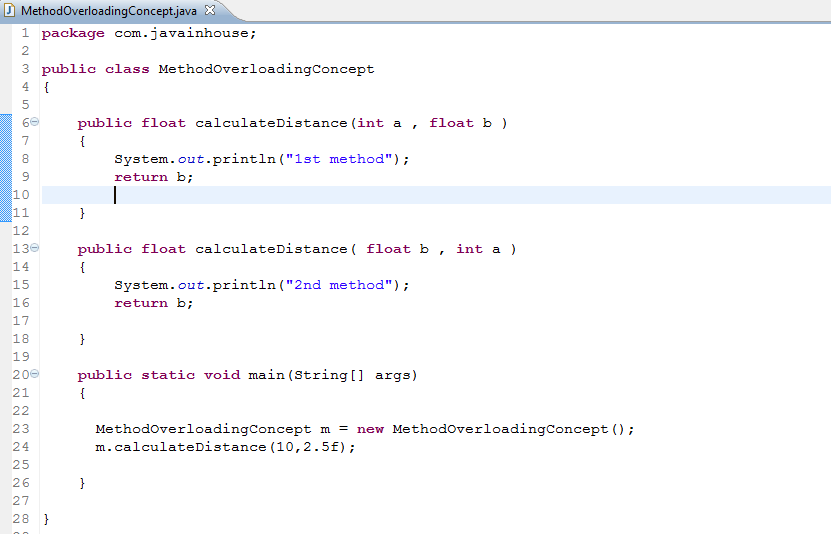
Output: 1st method
- Example 2 – Another example to show methods in child classes can also have method overloading
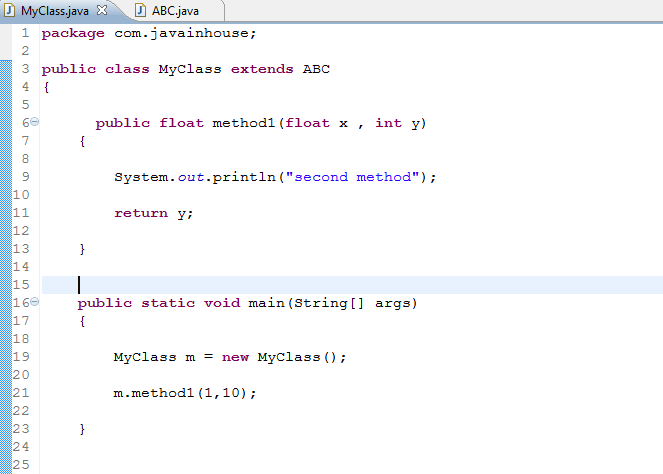
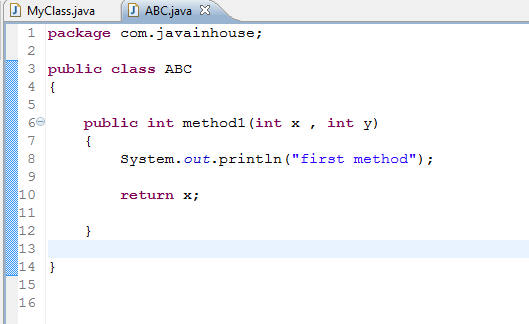
Output: 2nd method
Now, let us see the cases in which Method overloading is not performed –
Methods having same name in one class or in child class could not perform method overloading if they are just different in:
1) Name of argument, and not in number of arguments or type of arguments.
2) Having different return type only.
- At this point of time, many of you might be thinking How method overloading helps in java or I can say Why we need method overloading?
There are 2 points which comes out –
- It helps in maintaining consistency in method naming, doing same task with just a difference of input parameter.
- Helps in reducing overhead of remembering the name of different functions for same task, instead what we can do is we can pass different type or number of parameters to a single overloaded method/function.
Example –
public class ABC
{
public Employee getEmpById(int empId)
{
}
public Employee getEmpByName(int empName)
{
}
public Employee getEmpByDob(int empDob)
{
}
}
/*It’s better to overload methods with same functionality, this make the
code consistent and reduce overhead of remember method names with
different type and number of input parameter.*/
Instead write the code as –
public class ABC
{
public Employee getEmp(int empId)
{
}
public Employee getEmp(int empName)
{
}
public Employee getEmp(int empDob)
{
}
}
One important point to note:
- We can overload static and final method in java but we can’t override static method.
At the end, a small refresher on the interview questions related to overloading which might be asked from the java developers –
- Can main() method be overloaded in java?
- Answer: Yes. The main() method can be overload. But if you change the signature of the main method, the entry point for the program will be dimnished.
Spring MVC Tutorial Hello World

Step 1: First you need to Make a Dynamic project in Eclipse. Select file ->Dynamic Web project->Fill Name->Finish.

I gave name as SpringMVCHelloWorld

Step 2: Now you need to add some spring jars to your project lib folder and build path . Please refer to the screenshot below and add the exact version jars otherwise you may face some errors.


Step 3: Now we need to add some more files to the structure .I ll explain the wholw flow at the end ,first let us make the project work .You need
- JavainhouseController.java
- Index.jsp
- WelcomePage.jsp
- web.xml
- welcome-servlet.xml
JavainHouseController.java
package com.javainhouse;
import org.springframework.stereotype.Controller;
import org.springframework.web.bind.annotation.RequestMapping;
import org.springframework.web.servlet.ModelAndView;
@Controller
public class JavainhouseController {
@RequestMapping("/javainhouse")
public ModelAndView helloWorld() {
String message = "Welcome to Javainhouse";
return new ModelAndView("WelcomePage", "welcomeMessage", message);
}//ModelAndView closed
}
Index.jsp
<html>
<head>
<title>JavainHouse SpringMVC</title>
</head>
<body>
<font size="2px" face="verdana">
Welcome...
<a href="javainhouse.html"><br> Click here</a>
</font>
</body>
</html>
WelcomePage.jsp
<html>
<body>
${welcomeMessage}
</font>
</body>
</html>
web.xml
<?xml version="1.0" encoding="UTF-8"?>
<web-app xmlns:xsi="http://www.w3.org/2001/XMLSchema-instance" xmlns="http://java.sun.com/xml/ns/j2ee" xmlns:web="http://java.sun.com/xml/ns/javaee/web-app_2_5.xsd" xsi:schemaLocation="http://java.sun.com/xml/ns/j2ee http://java.sun.com/xml/ns/j2ee/web-app_2_4.xsd" id="WebApp_ID" version="2.4">
<servlet>
<servlet-name>welcome</servlet-name>
<servlet-class>org.springframework.web.servlet.DispatcherServlet</servlet-class>
<load-on-startup>1</load-on-startup>
</servlet>
<servlet-mapping>
<servlet-name>welcome</servlet-name>
<url-pattern>/</url-pattern>
</servlet-mapping>
<welcome-file-list>
<welcome-file>Index.jsp</welcome-file>
</welcome-file-list>
</web-app>
package com.javainhouse;
import org.springframework.stereotype.Controller;
import org.springframework.web.bind.annotation.RequestMapping;
import org.springframework.web.servlet.ModelAndView;
@Controller
public class JavainhouseController {
@RequestMapping("/javainhouse")
public ModelAndView helloWorld() {
String message = "Welcome to Javainhouse";
return new ModelAndView("WelcomePage", "welcomeMessage", message);
}//ModelAndView closed
}
Index.jsp
<html>
<head>
<title>JavainHouse SpringMVC</title>
</head>
<body>
<font size="2px" face="verdana">
Welcome...
<a href="javainhouse.html"><br> Click here</a>
</font>
</body>
</html>
WelcomePage.jsp
<html>
<body>
${welcomeMessage}
</font>
</body>
</html>
web.xml
<?xml version="1.0" encoding="UTF-8"?>
<web-app xmlns:xsi="http://www.w3.org/2001/XMLSchema-instance" xmlns="http://java.sun.com/xml/ns/j2ee" xmlns:web="http://java.sun.com/xml/ns/javaee/web-app_2_5.xsd" xsi:schemaLocation="http://java.sun.com/xml/ns/j2ee http://java.sun.com/xml/ns/j2ee/web-app_2_4.xsd" id="WebApp_ID" version="2.4">
<servlet>
<servlet-name>welcome</servlet-name>
<servlet-class>org.springframework.web.servlet.DispatcherServlet</servlet-class>
<load-on-startup>1</load-on-startup>
</servlet>
<servlet-mapping>
<servlet-name>welcome</servlet-name>
<url-pattern>/</url-pattern>
</servlet-mapping>
<welcome-file-list>
<welcome-file>Index.jsp</welcome-file>
</welcome-file-list>
</web-app>
welome-servlet.xml
<?xml version="1.0" encoding="UTF-8"?>
<beans xmlns="http://www.springframework.org/schema/beans"
xmlns:context="http://www.springframework.org/schema/context"
xmlns:xsi="http://www.w3.org/2001/XMLSchema-instance"
xsi:schemaLocation="
http://www.springframework.org/schema/beans
http://www.springframework.org/schema/beans/spring-beans-3.0.xsd
http://www.springframework.org/schema/context
http://www.springframework.org/schema/context/spring-context-3.0.xsd">
<context:component-scan base-package="com.javainhouse" />
<bean class="org.springframework.web.servlet.view.InternalResourceViewResolver">
<property name="prefix" value="/jsp/" />
<property name="suffix" value=".jsp" />
</bean>
</beans>
Step 4: The directory structure of all the files should be shown as in the screenshot below:

Step 5: Let us Run the project by right click on Index.jsp->Run on server .You ll see both the screens as below :


Execution :
1. web.xml is the very first file read by the spring .In web.xml ,we have given name of two servelts one is welcome and other is Dispatcher Servlet .For Dispacther Servlet we have given load startup as 1 which means it will be the first servlet loaded by spring .
2. After that servlet name is given as welcome ,now spring ll find a filename as welcome-servlet.xml in whole project and read it.
3. In welcome-spring.xml ,we have given <context:component-scan base-package="com.javainhouse" /> which means that in this base packages the Handler mapper need to look for the particular controller for the request given.
4. Index.jsp ll be the first jsp file which ll be loaded at first and display the output to the user .When user click on Click Here link then Handler mappper will start looking for the controller for this particular request means with Request mapping as javainhouse.
5. helloWorld() method will be executed and string message will be set.and Model with name welcomeMessage with value "Welcome to Javainhouse" and view WelcomePage ll be returned to the Dispather Servlet .
6. Now in welome-servlet.xml next thing is view resolver which ll be helping to resolve the directory structure of view returened i.e. WelcomePage . If ll prefix WelcomePage with jsp and suffix with .jsp i.e. now we ll find WelcomePage.jsp in folder jsp and this view ll be return to the user as shown.


